Google Slides Template - Scape: Visual Storytelling
Creating a presentation that feels both professional and visually distinct is often a balancing act. You want to convey complex information clearly without sacrificing the aesthetic quality that keeps an audience engaged. The Google Slides Template - Scape addresses this specific challenge by offering a design system rooted in environmental awareness and organic structure. Unlike standard corporate decks that rely on rigid grids and sterile white space, Scape introduces a visual personality that feels grounded and intentional. It is designed for storytellers who need their slides to reflect a narrative of growth, sustainability, or natural progression, making it particularly effective for creative agencies, startups, and personal portfolios.
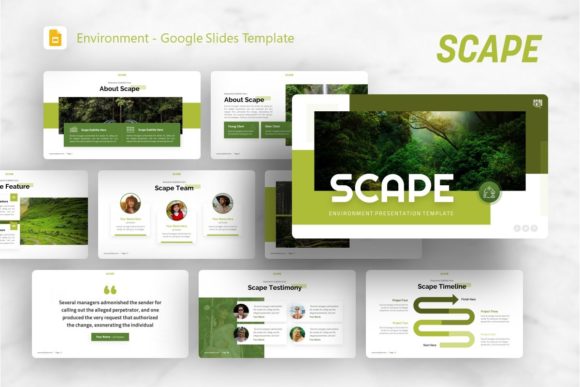
The visual characteristics of this template move beyond simple decoration. Scape utilizes a layout philosophy that mimics natural landscapes, using negative space and organic shapes to guide the viewer’s eye rather than forcing it through linear bullet points. This approach aligns with modern typography trends where readability meets artistic expression. When you open the file, you are not just looking at a background; you are interacting with a curated environment. The 36 included slides serve as a comprehensive toolkit, allowing users to maintain visual consistency across pitch decks, company profiles, and photography showcases without the design feeling repetitive or stagnant.
Where Organic Design Meets Professional Utility
Versatility is the primary strength of the Google Slides Template - Scape, but its application depends heavily on understanding its inherent mood. While it can technically be used for any business purpose, it excels in contexts where the brand identity benefits from a softer, more human-centric approach. For creative agencies and design firms, this template acts as a portfolio piece in itself, demonstrating an understanding of composition and whitespace. The handcrafted infographics included in the deck allow marketers to present data visualization that feels bespoke rather than generated, which is crucial when trying to differentiate a pitch deck in a crowded market.
Entrepreneurs and startup founders will find particular value in the template’s ability to soften technical content. When presenting a new technology or service, the starkness of traditional tech slides can sometimes alienate non-technical stakeholders. Scape bridges this gap by wrapping innovation in an accessible, environmentally conscious aesthetic. Similarly, photographers and content creators can utilize the picture placeholders to frame their work within a context that enhances rather than competes with the imagery. The drag-and-drop functionality ensures that even those without formal design training can maintain the integrity of the original layout while inserting their own visual assets.
For personal portfolios, the template offers a structured yet flexible canvas. Job seekers in creative fields often struggle to make PDF resumes or slide decks stand out. By leveraging the master slide architecture of Scape, individuals can create a cohesive personal brand narrative that signals attention to detail. The pixel-perfect illustrations provide a level of polish that suggests professionalism, while the organic style hints at creativity and adaptability. This duality is essential for freelancers and consultants who need to project reliability alongside innovation.
Influencing Perception Through Layout and Typography
The choice of a presentation template is effectively a choice of typeface and layout strategy combined. Just as a premium font or display font sets the tone for a logo design or editorial spread, the structural elements of Google Slides Template - Scape dictate how information is consumed. The template’s reliance on clean lines paired with organic accents creates a visual hierarchy that prioritizes clarity. In modern typography and web design, we often discuss the importance of breathing room; Scape applies this principle to presentation design, ensuring that text remains legible and that key messages are not lost in visual clutter.
This attention to visual hierarchy directly impacts audience engagement and retention. When slides are overcrowded or poorly organized, cognitive load increases, and the message degrades. Scape mitigates this by providing pre-designed structures that enforce good design habits. The master slides ensure that headers, body text, and captions remain consistent throughout the 36-slide deck, reinforcing brand recognition and professionalism. Consistency builds trust, whether you are pitching to investors or presenting a quarterly review. The template acts as a guardrail, preventing the common pitfalls of misaligned text or clashing colors that often plague DIY presentations.
Furthermore, the integration of vector icons and resizable graphics allows for seamless scaling across different mediums. A slide deck created in Scape can easily be repurposed for social media graphics or printed handouts because the underlying assets are built to be resolution-independent. This flexibility is vital for marketers and publishers who need to maximize the reach of their content assets. The template supports a holistic brand identity strategy where the presentation is just one touchpoint in a larger ecosystem of design materials.
Practical Implementation and Customization Strategy
To get the most out of Google Slides Template - Scape, users should approach customization with a strategic mindset. Start by evaluating the Master Slides before editing individual pages. Understanding the parent-child relationship in the file structure saves significant time and ensures global changes apply correctly. Since all graphics are resizable and editable, resist the urge to stretch images disproportionately. Maintain aspect ratios to preserve the pixel-perfect quality of the illustrations. If your content requires more text than a specific layout allows, consider splitting the information across two slides rather than reducing font size to illegibility.
When selecting fonts to pair with the template, aim for typefaces that complement its organic yet structured nature. A clean sans serif font often works best for body text to maintain high readability against the textured backgrounds, while a distinctive serif font or script font can be used sparingly for emphasis or section titles. Test these pairings at actual presentation size, as what looks good on a laptop screen may fail when projected. Remember that the demo images are for preview purposes only; replacing them with high-quality, relevant photography is essential for the template to function as intended. Low-resolution stock photos will undermine the premium feel of the design assets.
Finally, consider the licensing and commercial use implications if you are adapting this template for client work. Ensure that any additional fonts or icons you introduce are properly licensed for your specific use case. The documentation file included with the download provides essential guidance on editing techniques and resource links. Utilizing this resource prevents frustration and helps maintain the integrity of the original design. By treating Google Slides Template - Scape as a foundational design system rather than a disposable backdrop, you can create presentations that are not only informative but also memorable representations of your brand’s values and vision.