Google Slides Template - Commission: A Practical Guide
Creating a compelling presentation often requires balancing aesthetic appeal with structural clarity. For professionals managing tight deadlines, the Google Slides Template - Commission offers a streamlined foundation for communicating complex ideas effectively. While originally designed with commission marketing and corporate reporting in mind, this template’s architecture supports a much broader range of applications. Its value lies not just in its visual design, but in the underlying master slide system that allows for rapid customization without sacrificing consistency. Whether you are preparing a pitch deck for investors, showcasing a photography portfolio, or outlining a company profile, understanding how to leverage these pre-built assets can significantly reduce production time while elevating the perceived professionalism of your content.
Streamlining Visual Communication Through Master Slides
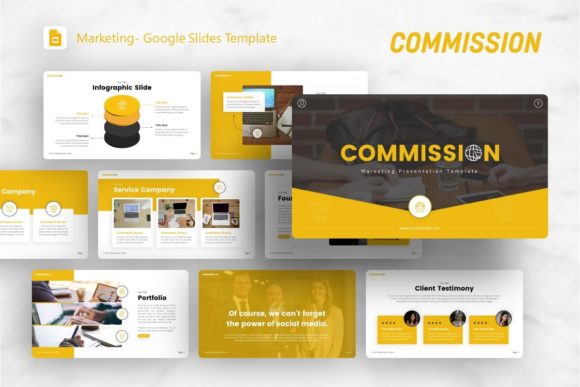
The core efficiency of the Google Slides Template - Commission stems from its reliance on master slides rather than individual slide formatting. Many users make the mistake of editing slides individually, which leads to inconsistency and wasted effort when global changes are needed. This template includes 36 distinct layouts built upon a unified master structure. This means that adjusting a color palette, updating a logo placement, or changing a font family across the entire deck requires only a few clicks in the master view. For marketing teams or agencies handling multiple client accounts, this feature ensures brand compliance and reduces the risk of formatting errors during high-pressure revisions.
Beyond basic formatting, the master slide integration supports dynamic content updates. When presenting data-heavy reports or commission structures, maintaining visual alignment is critical for audience comprehension. The handcrafted infographics included in this template are vector-based and fully editable within PowerPoint or Google Slides. Unlike static images that require external software to modify, these graphics allow you to adjust values, labels, and colors directly in the presentation environment. This capability is particularly useful for startups and small business owners who need to iterate on financial projections or growth metrics quickly without waiting for a designer to export new assets.
Practical Applications Across Diverse Industries
Versatility is a defining characteristic of effective presentation tools. Although the naming convention suggests a focus on sales commissions, the layout variety makes the Google Slides Template - Commission suitable for numerous professional contexts. Creative agencies can utilize the image-heavy slides to present campaign mood boards or case studies, taking advantage of the drag-and-drop picture placeholders to swap stock preview images with actual project work. Photographers and visual artists will find the clean, minimalist layouts ideal for personal portfolios where the imagery must take precedence over text. The pixel-perfect illustrations provide subtle visual interest without distracting from the primary subject matter.
For corporate and business environments, the template serves as a robust vehicle for internal communication and external pitching. The structured layouts facilitate clear storytelling, guiding stakeholders through problem statements, proposed solutions, and expected outcomes. Entrepreneurs developing pitch decks benefit from slides specifically designed to highlight team bios, market analysis, and revenue models. Educators and trainers can also adapt these frameworks for course materials, using the infographic slides to break down complex concepts into digestible visual components. The key is to view the template as a modular system rather than a fixed document; each of the 36 slides functions as a reusable component that can be duplicated, rearranged, or removed based on specific narrative needs.
Evaluating Technical Features and Workflow Integration
Understanding the technical specifications helps set realistic expectations for implementation. The Google Slides Template - Commission is delivered as a .PPTX file, ensuring broad compatibility across Microsoft PowerPoint and seamless importation into Google Slides. Users should note that while the template is optimized for both platforms, certain advanced animations or transitions may behave differently depending on the software version. The inclusion of vector icons eliminates the need to source third-party graphics, keeping the visual language cohesive throughout the presentation. All graphics are resizable and editable, meaning they remain crisp whether projected on a large conference screen or viewed on a mobile device.
A crucial consideration for new users is the distinction between template assets and demo content. As noted in the product documentation, all images shown in the preview are for demonstration purposes only and are not included in the downloadable files. This is standard practice for presentation templates but requires users to have their own visual assets ready before beginning customization. The included documentation file provides guidance on editing master slides and utilizing placeholder features, which is invaluable for those less familiar with advanced presentation design techniques. Investing ten minutes to review this documentation can prevent hours of frustration later in the workflow.
Maximizing Impact Without Over-Designing
One common pitfall when using comprehensive templates like the Google Slides Template - Commission is the temptation to use every available feature. Effective presentations prioritize clarity over decoration. Just because 36 unique slides are available does not mean all should be utilized in a single deck. Select layouts that genuinely support your message and discard those that add unnecessary complexity. For instance, a commission marketing presentation might only require fifteen carefully curated slides to convey the compensation structure and performance expectations clearly. Adding extra infographic slides simply to fill space can dilute the core message and overwhelm the audience.
Focus on customizing the template to reflect authentic brand identity rather than generic polish. Replace default typography with your organization’s approved fonts, adjust color schemes to match official brand guidelines, and rewrite placeholder text with concise, audience-specific language. The handcrafted infographics should be simplified if necessary; a chart showing three key metrics is often more impactful than one displaying twelve data points. Remember that the template is a starting point, not a final product. The goal is to create a presentation that feels bespoke and intentional, even though it leverages pre-existing design infrastructure.
Strategic Considerations for Long-Term Use
Adopting the Google Slides Template - Commission as part of your regular presentation workflow offers benefits beyond individual projects. Establishing a standardized template library improves organizational efficiency by reducing the cognitive load associated with design decisions. Team members spend less time debating slide aesthetics and more time refining content strategy. Over time, this consistency builds recognition and trust with recurring audiences, whether they are clients, investors, or internal stakeholders. The template’s modular nature also facilitates collaboration; different team members can work on separate sections simultaneously without worrying about formatting conflicts when merging contributions.
However, it is important to recognize limitations and assess fit critically. If your presentation requires highly specialized data visualization or interactive elements beyond standard slide capabilities, this template may need supplementation with dedicated charting tools or custom development. Similarly, organizations with extremely rigid brand guidelines may find that modifying the master slides to achieve exact compliance requires significant initial investment. In such cases, compare this option against templates specifically designed for your industry vertical or consider commissioning a custom template. The Google Slides Template - Commission excels as a flexible, general-purpose solution for professionals who value speed and quality balance, but it is not universally optimal for every conceivable scenario.
Ultimately, the effectiveness of any presentation tool depends on how thoughtfully it is applied. By leveraging the master slide architecture, respecting the separation of demo and actual content, and focusing customization efforts on genuine communication goals, users can transform the Google Slides Template - Commission from a generic download into a powerful asset for professional expression. The combination of 36 versatile layouts, editable vector graphics, and cross-platform compatibility provides a solid foundation for diverse presentation needs. Success comes not from the template itself, but from the strategic decisions made during the adaptation process—decisions that prioritize audience understanding, message clarity, and authentic representation of your work or organization.