Presentation Template - Blizzard: Design Guide
Creating a compelling visual narrative requires more than just good data; it demands a cohesive design system that guides the audience through your message without friction. Presentation Template - Blizzard serves as this foundational system for modern professionals. Rather than forcing you to build slides from scratch, this template provides a structured yet flexible environment tailored for high-stakes communication. Its visual personality strikes a deliberate balance between corporate professionalism and creative fluidity, making it distinct from generic office themes. The aesthetic is clean and uncluttered, utilizing whitespace effectively to let content breathe while maintaining enough visual interest to keep stakeholders engaged.
The true strength of Blizzard lies in its versatility across different sectors. While many templates pigeonhole users into a specific industry look, this asset adapts seamlessly whether you are pitching a tech startup, showcasing a photography portfolio, or outlining an agricultural business strategy. For creative agencies and freelancers, the layout supports bold imagery and minimalist typography, allowing your work to take center stage. Conversely, for corporate entities and publishers, the grid-based structure ensures that dense information remains digestible. This adaptability stems from a design philosophy that prioritizes function over decoration, ensuring the template enhances rather than distracts from your core message.
Visual Hierarchy and Audience Engagement
In professional brand identity and communication, consistency builds trust. Presentation Template - Blizzard facilitates this through its Master Slide architecture. When you adjust a color palette or logo placement on a master slide, the change propagates instantly across all 35 included slides. This feature is critical for maintaining visual integrity during collaborative projects where multiple team members might be editing the deck simultaneously. It prevents the common issue of "slide drift," where fonts, margins, and colors slowly degrade over the course of a long presentation. By locking in these stylistic parameters, you ensure that the final output looks like it was crafted by a single designer, reinforcing your organization's attention to detail.
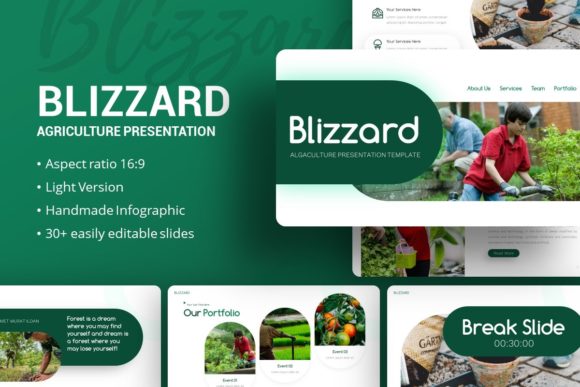
Readability and information retention are directly influenced by how data is presented. Blizzard includes handcrafted infographics specifically designed within PowerPoint. Unlike static images imported from external software, these vector-based elements remain fully editable. You can modify chart values, adjust segment colors, and resize components without losing quality or resorting to pixelated screenshots. This capability transforms complex datasets into clear visual stories. Whether you are displaying quarterly growth metrics for investors or explaining a workflow process to new hires, the ability to customize these graphics ensures they align perfectly with your specific context. This level of integration supports better cognitive processing for your audience, as the visual style remains consistent with the surrounding text and imagery.
Practical Application Across Creative and Commercial Projects
Different audiences require different approaches to visual storytelling. Understanding where and how to leverage this template maximizes its value:
- Startup Pitch Decks: Investors review hundreds of decks monthly. Blizzard’s clean layouts help structure your problem-solution narrative clearly. Use the dedicated comparison slides to highlight market advantages and the timeline slides to demonstrate traction. The professional polish signals maturity and preparedness.
- Creative Portfolios: Photographers and designers need grids that respect aspect ratios. The picture placeholders in Blizzard are designed for drag-and-drop functionality but also allow for manual cropping adjustments. This ensures your work isn't awkwardly stretched or cropped, preserving the artistic intent of your original pieces.
- Corporate Reporting: Internal stakeholders need clarity over flair. Utilize the text-heavy layouts for executive summaries and the infographic slides for KPI tracking. The template’s neutral background options prevent visual fatigue during lengthy quarterly reviews.
- Agriculture and Industry: As hinted by the name, this template works exceptionally well for agri-business and industrial sectors. The organic yet structured feel complements topics related to sustainability, land management, and production logistics without appearing overly rustic or too sterile.
When evaluating if this asset fits your current project, consider your content density. If your presentation relies heavily on video or interactive prototypes, test the media placeholder compatibility first. While Blizzard is robust, every project has unique technical constraints. Review the included documentation file before starting; it often contains tips on font pairing and image sourcing that can save hours of troubleshooting. Remember that the demo images are for preview purposes only, so plan your visual assets accordingly. Sourcing high-quality, relevant photography that matches the template’s lighting and tone will significantly elevate the final result compared to using mismatched stock photos.
Customization Strategy and Asset Management
Owning a premium design asset involves understanding licensing and file management. The .PPTX format ensures broad compatibility across Windows and macOS environments, but always verify that your version of PowerPoint supports modern features like morph transitions or SVG icon rendering if you plan to use them. The included vector icons are a valuable resource for editorial design and slide decoration. Because they are vectors, they scale infinitely without aliasing, which is essential if you plan to repurpose slide content for large-format print materials or high-resolution digital displays later.
For those working in web design or social media content creation, individual slides from Blizzard can serve as excellent starting points for carousel posts or web banners. Exporting specific slides as high-res PNGs or PDFs allows you to maintain brand consistency across channels without rebuilding layouts in Canva or Figma. This cross-platform utility extends the ROI of the template beyond the boardroom. However, always check the specific license terms regarding commercial redistribution or client deliverables to ensure compliance.
Effective use of Presentation Template - Blizzard ultimately depends on restraint. With 35 unique slides available, there is a temptation to use variety for its own sake. Resist this urge. Select a subset of 10 to 15 slides that best support your specific narrative arc and stick to them. Consistency creates rhythm, and rhythm aids comprehension. Treat the template as a sophisticated toolkit rather than a rigid constraint. Adjust spacing, swap out icon sets, and refine the color grading to match your specific brand identity. When used thoughtfully, Blizzard becomes invisible, leaving your audience focused entirely on the value of your ideas and the strength of your proposition.