Presentation Template - Ecoast: Design Guide
In the fast-paced world of professional communication, the difference between a forgettable meeting and a compelling narrative often comes down to visual structure. The Presentation Template - Ecoast addresses this challenge by providing a comprehensive framework designed for versatility rather than niche specificity. Whether you are preparing a quarterly business review, launching a creative agency portfolio, or pitching a startup concept to investors, this template serves as a foundational tool that balances aesthetic appeal with functional utility. It moves beyond generic slide designs to offer a system that respects both the presenter's time and the audience's attention span.
Core Architecture and Technical Specifications
At the heart of the Presentation Template - Ecoast is a robust architecture built on Master Slides. This is a critical distinction for professionals who have ever struggled with misaligned text boxes or inconsistent fonts across fifty slides. By utilizing master slide technology, global changes propagate instantly throughout the deck. If your brand guidelines shift from navy blue to forest green, or if you need to update a logo placement, you make the adjustment once in the master view, and it applies universally. This ensures pixel-perfect consistency without the tedious manual formatting that often consumes hours of preparation time.
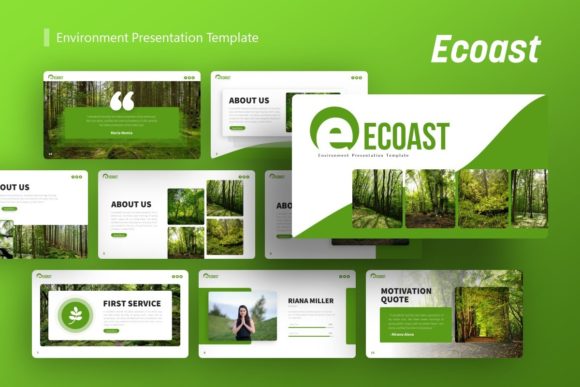
The template includes 36 unique slides for each variation, providing ample variety without overwhelming the user with unnecessary bloat. This count strikes a practical balance; it offers enough distinct layouts to handle complex data visualization, team introductions, and strategic roadmaps, while remaining curated enough to maintain a cohesive visual identity. Every graphic element within these slides is fully resizable and editable. Unlike flattened images that lose quality when scaled, the vector-based illustrations and handcrafted infographics in PowerPoint retain their crispness whether projected on a conference room screen or viewed on a mobile device.
Handcrafted Infographics and Visual Data
Data presentation is often where decks fail. Standard charts can feel sterile, while custom graphics are usually too expensive to commission for every project. Ecoast bridges this gap with handcrafted infographics built directly into PowerPoint. These are not static pictures; they are native shapes and smart art that you can modify to reflect your actual metrics. This capability allows marketers and educators to transform dry statistics into engaging visual stories. Because the graphics are editable, you can adjust colors to match your corporate palette or resize elements to emphasize specific data points, ensuring the visual hierarchy supports your spoken narrative.
Versatile Applications Across Industries
The true value of the Presentation Template - Ecoast lies in its adaptability. It avoids the trap of being overly themed, which often limits a template to a single industry. Instead, it employs a clean, modern aesthetic that acts as a chameleon for various professional contexts.
- Creative Agencies and Portfolios: For designers and photographers, the template offers image-heavy layouts with generous whitespace. The picture placeholders utilize a drag-and-drop functionality, allowing creatives to swap portfolio pieces rapidly without wrestling with cropping tools or aspect ratios.
- Corporate and Business Profiles: Established companies require a tone of professionalism and reliability. The structured layouts in Ecoast support organizational charts, timeline overviews, and service breakdowns that convey stability and clarity. The clean typography ensures readability during board meetings or client onboarding sessions.
- Startups and Pitch Decks: Entrepreneurs need to communicate vision quickly. The template includes slides specifically suited for problem-solution narratives, market sizing, and business models. The ability to customize infographics means founders can present proprietary data visually, helping to differentiate their pitch from competitors using standard chart types.
- Educational and Training Materials: Educators and trainers benefit from the modular nature of the slides. Complex concepts can be broken down into digestible visual segments. The consistent styling helps reduce cognitive load for students, allowing them to focus on the content rather than deciphering erratic design choices.
Streamlining Workflow with Drag-and-Drop Efficiency
Time is a non-renewable resource for freelancers and business owners. The Presentation Template - Ecoast is engineered to reduce production friction. The drag-and-drop picture placeholders are a prime example of user-centric design. In traditional workflows, inserting an image often requires resizing the frame, adjusting the crop, and checking alignment. Here, the placeholder handles the masking automatically. You simply drop your media into the designated area, and it snaps to fit perfectly. This seemingly small feature accumulates significant time savings when building a deck with twenty or more images.
Furthermore, the inclusion of a documentation file and vector icon set eliminates the need to source external assets. Searching for matching icons or reading through vague instructions breaks creative flow. Having these resources bundled within the .PPTX file and accompanying documentation ensures that you remain in the zone, focusing on message crafting rather than asset management.
Strategic Considerations for Implementation
While the Presentation Template - Ecoast provides a powerful toolkit, maximizing its potential requires a strategic approach. Users should remember that the demo images are for preview purposes only and are not included in the final files. This is actually a benefit, as it prevents the accidental use of unlicensed stock photography in commercial projects. Always plan to use your own high-quality imagery or properly licensed assets to maintain legal compliance and brand authenticity.
When evaluating this template for a specific project, consider the density of your content. With 36 slides available, there is a temptation to use more rather than less. However, effective presentation design is often about subtraction. Select only the layouts that genuinely enhance your message. A ten-slide deck using Ecoast’s strongest layouts will always outperform a thirty-slide deck that uses filler content just to utilize the template's full capacity.
Customization should also extend to typography. While the default fonts are chosen for broad compatibility and readability, swapping them for your organization’s official typeface can significantly boost brand recognition. Because the template is based on master slides, this font transition is seamless. Additionally, take advantage of the editable color schemes. Even if you love the default eco-friendly or corporate tones, adjusting the accent colors to align precisely with your brand guidelines creates a subconscious link between the presentation and your broader marketing materials.
Enhancing Audience Engagement Through Design
Ultimately, the goal of using the Presentation Template - Ecoast is to improve communication outcomes. Good design is invisible; it facilitates understanding without drawing attention to itself. By providing a polished, professional container for your ideas, this template removes the distractions caused by amateur formatting. Your audience stops noticing the slides and starts listening to your insights. The pixel-perfect illustrations and balanced layouts create a rhythm that keeps viewers engaged, preventing the fatigue associated with cluttered or inconsistent decks.
For personal portfolios, the template offers a way to stand out in a crowded job market. Recruiters and clients appreciate candidates who can present their work clearly and professionally. Using a structured template like Ecoast signals that you possess not only creative skills but also an understanding of professional standards and user experience. It demonstrates that you value the viewer's time and have put effort into making your work accessible.
In commercial environments, the efficiency gains translate directly to productivity. Teams can establish a standardized look for internal and external communications, reducing the approval cycles often required for bespoke design work. When everyone uses the same master slides, collaboration becomes easier. Colleagues can merge decks without reformatting, and updates can be made centrally. This operational efficiency is particularly valuable for agencies managing multiple client accounts or corporations with distributed teams.
Selecting the right presentation tool is an investment in your professional reputation. The Presentation Template - Ecoast offers a pragmatic solution for those who demand high-quality visuals without the steep learning curve of professional design software or the high cost of custom agencies. By combining technical robustness with aesthetic flexibility, it empowers users across the spectrum—from hobbyists to enterprise leaders—to communicate with confidence, clarity, and impact. Whether you are telling a story of innovation, showcasing a body of work, or educating a new cohort, this template provides the structural integrity needed to make your message resonate.