Evaluating Presentation Template - Finco for Professional Financial Decks
Selecting the right visual framework for a financial presentation involves balancing aesthetic appeal with functional data delivery. The Presentation Template - Finco is designed specifically to address this intersection, offering a structured environment for finance-related communication. Unlike generic business templates that prioritize broad versatility over specific utility, Finco focuses on the unique requirements of financial storytelling, including investor pitch decks, corporate profiles, and quarterly reports. Understanding its specific feature set, limitations, and ideal use cases is essential for professionals comparing it against other market options or custom design solutions.
Core Features and Technical Specifications
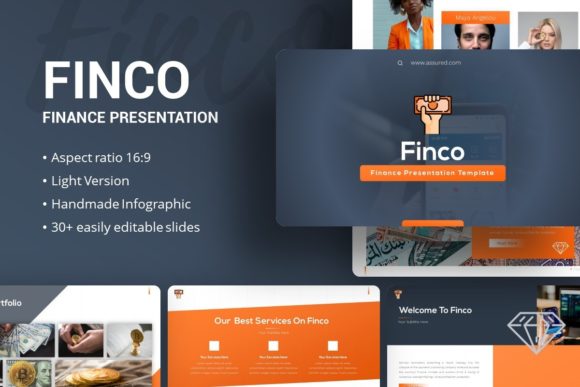
When evaluating Presentation Template - Finco, it is necessary to look beyond the preview images and understand the underlying architecture. The template includes 35 distinct slides, which serves as a comprehensive library for most standard financial narratives. This volume allows presenters to construct a complete deck without needing to source additional layouts, yet it remains streamlined enough to avoid the bloat often associated with mega-bundles containing hundreds of unused slides.
A critical technical differentiator is the reliance on Master Slides. Many lower-quality templates apply formatting directly to individual slide objects, making global changes tedious and error-prone. Finco’s adherence to Master Slide architecture means that updating a logo, changing a color palette, or adjusting font hierarchy can be done globally across the entire presentation with minimal effort. This feature significantly reduces the maintenance burden for teams that update their branding or data regularly.
The inclusion of handcrafted infographics within PowerPoint distinguishes this resource from templates that rely on static JPEG or PNG images for charts. Because these graphics are native vector elements, they remain crisp at any zoom level and are fully editable. Users can modify data points, colors, and labels directly within the software without requiring external tools like Adobe Illustrator. Additionally, the picture placeholders utilize drag-and-drop functionality, streamlining the process of replacing preview imagery with actual company assets. It is important to note, however, that the high-quality photography seen in promotional previews is not included in the downloadable files; users must supply their own imagery.
File Deliverables and Asset Management
- PowerPoint .PPTX File: The primary deliverable compatible with modern versions of Microsoft PowerPoint.
- Documentation File: Provides guidance on editing master slides, replacing icons, and managing color themes.
- Vector Icon Set: A supplementary collection of scalable icons to maintain visual consistency without relying on mismatched external libraries.
Comparing Finco Against Generic and Custom Alternatives
Professionals typically choose between three categories when building a finance deck: premium niche templates like Finco, generic multipurpose bundles, or bespoke agency design. Each approach carries distinct tradeoffs regarding cost, time, and brand alignment.
Versus Generic Multipurpose Templates: Generalist templates often offer higher slide counts but lack industry-specific context. They may include layouts for retail, education, or healthcare that are irrelevant to a financial analyst. Finco provides a more curated experience where the pre-designed layouts anticipate financial data visualization needs. While a generic template might require significant restructuring to fit a balance sheet or investment timeline, Finco offers these structures out-of-the-box. The tradeoff is flexibility; if your presentation requires highly creative, non-corporate artistic expression, a niche finance template may feel too rigid compared to an abstract creative bundle.
Versus Custom Agency Design: Hiring a designer ensures a completely unique visual identity tailored to specific brand guidelines. However, this route is expensive and time-consuming, often costing thousands of dollars and requiring weeks of revision cycles. Presentation Template - Finco occupies the middle ground. It provides professional-grade polish and structural integrity at a fraction of the cost, but it does not offer exclusivity. Other organizations may use the same base layout. For startups raising seed capital or internal corporate updates, this level of shared design is usually acceptable. For major IPO roadshows or luxury brand positioning, the lack of exclusivity might be a limiting factor.
Versus Free Resources: Free templates often suffer from broken master slides, low-resolution raster graphics, and inconsistent typography. Finco’s pixel-perfect illustrations and resizable vector graphics address the quality gap found in free alternatives. The time saved in fixing formatting errors and sourcing matching icons often justifies the investment for professionals whose hourly rate exceeds the template's cost.
Ideal Use Cases and Audience Fit
While marketed broadly, Presentation Template - Finco performs best in specific scenarios where clarity and trust are paramount. Its design language leans toward clean, corporate professionalism rather than experimental artistry.
Startup Pitch Decks and Fundraising
For founders presenting to venture capitalists or angel investors, narrative structure is as important as visual design. Investors expect specific slides: problem, solution, market size, business model, traction, and team. Finco’s 35-slide library likely covers these standard sections, allowing founders to focus on content refinement rather than layout invention. The handcrafted infographics are particularly valuable here for visualizing growth metrics and financial projections without hiring a data visualization specialist.
Corporate Reporting and Company Profiles
Established businesses requiring annual reports, quarterly reviews, or partnership proposals benefit from the template’s Master Slide efficiency. Finance teams often need to update decks rapidly as new data becomes available. The ability to swap charts and adjust figures natively in PowerPoint without breaking the design system makes this a practical operational tool, not just a creative asset.
Creative Agencies and Portfolios
Although finance-centric, the clean grid systems and ample whitespace make Finco adaptable for creative agencies showcasing fintech work or B2B services. Photographers or consultants targeting corporate clients may also find the restrained aesthetic appropriate for personal portfolios where the goal is to appear established and reliable rather than avant-garde.
Limitations and Decision Factors
No template is universally suitable. Prospective users should weigh several constraints before selecting Presentation Template - Finco.
Software Compatibility: As a .PPTX file, it is optimized for Microsoft PowerPoint. Users relying exclusively on Keynote, Google Slides, or Canva may encounter formatting shifts, missing fonts, or broken master slide links during conversion. While basic editing is often possible across platforms, advanced features like specific infographic animations or master slide controls may degrade outside the native ecosystem.
Learning Curve for Master Slides: While Master Slides are a strength for experienced users, they can confuse novices accustomed to editing objects directly on the canvas. Users unfamiliar with PowerPoint’s backend architecture may initially struggle to change global elements. The included documentation mitigates this, but those seeking a purely drag-and-drop surface-level editor might find the learning curve steeper than simpler, less robust templates.
Visual Tone Alignment: Finco projects competence and stability. If your objective is to signal disruption, youth culture, or artistic rebellion, this template’s conventional corporate geometry may send the wrong message. Evaluators should compare the template’s mood against their audience’s expectations. A crypto startup targeting Gen Z investors might need something more vibrant, while a wealth management firm targeting retirees will find Finco’s tone appropriate.
Image Sourcing Responsibility: The exclusion of preview images is standard licensing practice, but it adds a post-purchase workload. Users must have access to high-quality stock photography or proprietary assets that match the template’s lighting and composition style. Inserting low-resolution or stylistically clashing photos into a pixel-perfect template can diminish its perceived value. Budgeting time and resources for proper image acquisition is part of the total cost of ownership.
Making the Final Selection
Choosing Presentation Template - Finco ultimately depends on the ratio of required polish to available budget and time. It represents a pragmatic solution for professionals who need above-average visual quality without the expense of custom design. It excels in environments where data clarity, editability, and corporate credibility take precedence over artistic novelty.
For users prioritizing speed and industry relevance, Finco’s pre-built financial structures and native infographics offer immediate utility. For those requiring total brand exclusivity or working outside the Microsoft ecosystem, alternative paths may be superior. By assessing specific project requirements against these technical and strategic factors, decision-makers can determine whether this template aligns with their communication goals or if another resource better serves their unique context. The presence of documentation and vector assets further supports long-term usability, suggesting it is built for repeated professional application rather than single-use disposable presentations.