Evaluating Presentation Template - Vigor for Professional and Wellness Communication
Selecting the right visual framework for a presentation often involves balancing aesthetic appeal with functional versatility. For professionals in creative agencies, corporate environments, or the wellness sector, Presentation Template - Vigor offers a specific design language that bridges the gap between energetic modernism and structured professionalism. Unlike generic corporate themes that prioritize sterility, or purely artistic templates that sacrifice readability, Vigor is engineered to support narrative-driven content across diverse industries. Understanding its technical specifications, intended use cases, and limitations compared to other market options is essential for determining whether it aligns with your current project requirements.
Defining the Scope and Technical Capabilities
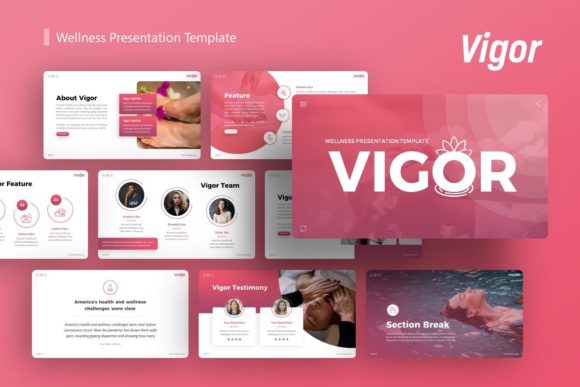
At its core, Presentation Template - Vigor is a comprehensive PowerPoint (.PPTX) resource designed for high adaptability. It includes 36 unique slides per template variation, providing sufficient depth for pitch decks, company profiles, and detailed portfolios without overwhelming the user with redundant layouts. A critical distinction of this template is its reliance on Master Slides. This architectural choice ensures global consistency; changing a font style or color palette on the master slide propagates instantly across all 36 slides, significantly reducing formatting time during revisions.
The template features handcrafted infographics and pixel-perfect illustrations that are fully vector-based. This means every graphic element is resizable and editable without loss of quality, a necessary feature for presentations that may be displayed on everything from mobile devices to large-format conference screens. Users should note that while the template includes picture placeholders with drag-and-drop functionality, the specific photography seen in promotional previews is not included. This requires users to source their own imagery, which adds a step to the workflow but ensures the final product remains original and legally compliant for commercial use.
Comparative Analysis: Vigor Versus Generic Corporate Themes
When evaluating Vigor against standard business templates, several key differences emerge regarding tone and audience engagement. Traditional corporate templates often utilize rigid grids, muted blues, and conservative typography suitable for financial reporting or internal compliance updates. While safe, these designs can struggle to convey innovation or human-centric values.
In contrast, Presentation Template - Vigor incorporates dynamic spacing and vibrant yet balanced color theory. This makes it particularly effective for:
- Creative Agencies and Portfolios: Where the presentation itself serves as proof of design competence.
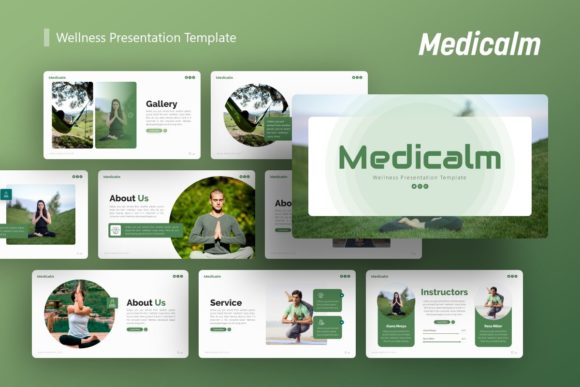
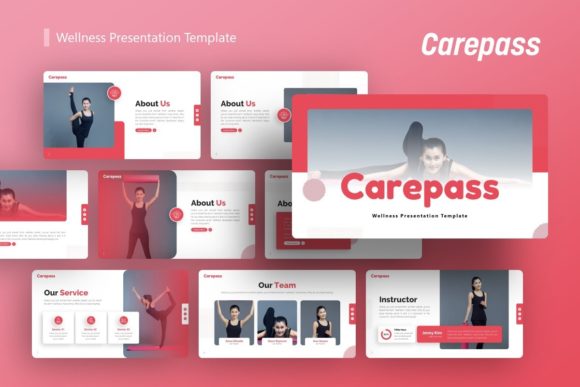
- Wellness and Health Brands: Where the visual identity must evoke vitality, balance, and trust rather than cold efficiency.
- Startup Pitch Decks: Where capturing investor attention through visual storytelling is as important as the data itself.
However, this stylistic distinctiveness comes with tradeoffs. If your primary objective is to present dense tabular data, legal disclaimers, or highly regulated financial forecasts, a more austere, grid-heavy alternative may offer better information density. Vigor prioritizes negative space and visual hierarchy over maximum text capacity. Users requiring extensive bullet points per slide may find themselves fighting the template’s intended layout, whereas those focusing on key messages and visual support will find the structure enhances retention.
Assessing Fit for Specific Use Cases
Determining whether Vigor is the optimal choice depends heavily on the nature of your content and your audience's expectations. The template’s versatility allows it to serve multiple functions, but it excels in specific scenarios where "energy" and "professionalism" must coexist.
Ideal Scenarios for Adoption
Vigor is strongly recommended for external-facing communications where brand perception is paramount. For a wellness startup introducing a new holistic health platform, the template’s organic shapes and clean lines reinforce the message of well-being without appearing unscientific. Similarly, for a photography portfolio, the minimalist backgrounds ensure that the user's work remains the focal point, with the template acting as a subtle frame rather than a distraction. The inclusion of dedicated infographic slides also benefits consultants and strategists who need to visualize processes or growth metrics in a way that feels bespoke rather than auto-generated.
Situations Requiring Alternatives
Conversely, there are contexts where Presentation Template - Vigor may introduce unnecessary friction. For internal quarterly reviews focused solely on variance analysis, the decorative elements may be perceived as superfluous. Additionally, teams without access to high-quality custom photography may struggle; because the template relies on strong visuals to maintain its aesthetic balance, using low-resolution stock photos or leaving placeholders empty can degrade the overall impact more severely than it would in a text-heavy template. In such cases, a simpler, typography-focused alternative might yield a more polished result with fewer asset requirements.
Evaluating Customization and Workflow Efficiency
A major decision factor for any presentation resource is the time investment required to adapt it. Vigor scores well in this regard due to its documentation file and master slide architecture. The learning curve is generally low for intermediate PowerPoint users. The drag-and-drop picture placeholders streamline the process of swapping demo images for actual content, and the vector icons allow for color matching without needing external software like Adobe Illustrator.
However, users should realistically assess their editing capabilities. While "fully editable" is a standard claim, achieving the pixel-perfect look shown in previews requires an understanding of alignment, grouping, and layer management. Beginners may find that moving complex infographic elements disrupts the layout if they do not utilize the selection pane effectively. Compared to web-based presentation tools that lock elements into fixed containers, Vigor offers superior freedom but demands greater user discipline. For teams accustomed to strict brand guidelines, the ability to edit every vector node is a significant advantage over SaaS alternatives that limit customization to predefined theme settings.
Strategic Considerations for Long-Term Value
Beyond immediate aesthetics, selecting Presentation Template - Vigor involves considering long-term utility. Because it is a standalone .PPTX file rather than a subscription-based cloud asset, it offers permanence and offline reliability. There is no risk of a platform update altering your slides or a licensing change restricting future use. This ownership model is particularly valuable for agencies creating deliverables for clients who require source files.
Furthermore, the 36-slide count strikes a practical balance. Templates with 100+ slides often suffer from bloat, making navigation difficult and increasing file size. Templates with fewer than 20 slides frequently lack variety, forcing users to duplicate and modify layouts manually. Vigor’s scope covers the essential archetypes—introduction, team, services, timeline, data visualization, and closing—without excess. This curated approach supports faster decision-making during the design phase, as users spend less time scrolling through irrelevant options and more time refining their narrative.
Making the Final Selection Decision
Ultimately, the decision to utilize Presentation Template - Vigor should be driven by a clear alignment between the template’s strengths and your communication goals. It represents a middle-ground solution that rejects both boring conformity and chaotic artistry. It is best suited for professionals who view their presentation as a strategic asset rather than a mere container for text.
If your priority is conveying vigor, creativity, and modern professionalism, and you possess the visual assets to complement the design, this template provides a robust foundation. If, however, your needs are strictly utilitarian or you lack the resources to populate a visually-led framework, exploring more conservative or automated alternatives may be more prudent. By weighing these factors objectively, you can select a tool that not only looks appropriate but actively facilitates clearer, more persuasive communication.